Easy Secure Logins
that can't be shared.
And you'll know who's really on every seat.
No SMS codes or emails to intercept and pay for. LoginBlasts turns a company login into a single approval on the user's own phone — landing right on the screen where they are signing in.
And because every sign-in is a signed event from a device you can recognise, you finally see which accounts are being shared — without fingerprinting anybody.
Added benefit: reach those same customers over an encrypted pipeline with no carrier in the middle. See Blasts.app
Animated demonstration: a user clicks "Sign in with LoginBlasts" on the Acme Corp portal. An approval card slides in with a single Approve button. Approving signs the assertion locally on the machine and the portal flips to "Verified — session established." The secret never travels over any network.
Simulation. Approval ceremony — signed locally on the machine.
Your attackers don't break the login.
They ride the delivery channel.
Every legacy factor ships a secret to the user — over a carrier network, an inbox, or a push pipe. That delivery leg is where accounts are lost. LoginBlasts removes the leg entirely.
SMS OTP Interception & SIM Swap
A six-digit secret crosses the telecom network to reach the user. Convince a carrier rep to port the number — or intercept the message — and the account falls without touching your systems.
LOGINBLASTS: no code is transmitted, so there is nothing to intercept and no number worth stealing.
Phishing Kits & Fake Pages
Proxy kits clone your sign-in page and relay whatever the victim types — password, then OTP — straight to the real site in real time. The user hands the secret over willingly.
LOGINBLASTS: typing the match code into the paired app proves the user is looking at the genuine screen; approvals are signed against the request, not typed into a page.
Push-Fatigue / MFA Bombing
With a stolen password, attackers fire approval prompts at a phone — #1, #7, #23, at 2 AM — until one exhausted thumb slips. Detection and throttling only manage the flood.
LOGINBLASTS: a request without consent on file is refused at creation. Prompt count: zero. There is no flood to manage.
Password Reuse & Breach Replay
Credentials leaked from someone else's breach get replayed against your portal. Any factor that merely wraps a password inherits the password's blast radius.
LOGINBLASTS: approvals are signed by a device-resident key — and the full-passwordless stage removes the password from the equation entirely.
“...such requests are architecturally undeliverable — the request object is never created — rather than delivered and then rate-limited or policy-blocked.” “...authentication fatigue attacks against users of the present system are prevented by architectural design rather than by rate-limiting policy.”
The industry just called it.
In August 2026, Microsoft notified Entra ID tenants that Microsoft-provided SMS and voice authentication are being retired in favor of phishing-resistant authentication by default. The clock below is real.
Microsoft-provided SMS authentication retires in
February 1, 2027 — Microsoft-provided SMS and voice authentication fully retire in Microsoft Entra ID.
SEP 1, 2026
Passkeys by default
Users enabled for SMS or voice are automatically enabled for passkeys and nudged to register.
FEB 1, 2027
SMS and voice fully retire
Microsoft-provided SMS and voice authentication fully retire in Microsoft Entra ID.
AFTER FEB 1, 2027
Blocking prompt — no opt out
Users whose only MFA is SMS or voice get a blocking prompt. “There is no opt out from this enforcement; it applies to all tenants.”
“SMS and voice are among the most vulnerable authentication methods available today and provide significantly weaker protection against phishing, SIM-swap, and replay attacks than passkeys.”
“The AI era demands stronger, phishing-resistant authentication.”
Microsoft's prescription is phishing-resistant authentication by default. LoginBlasts is in the same phishing-resistant family — and adds what passkeys alone do not: consent-gated request delivery (unsolicited prompts are architecturally undeliverable), an org-configurable strength ladder with recorded liability allocation, approval on the requesting surface, and a verified message channel after login.
Microsoft's notice addresses the retirement of its own SMS and voice authentication. It does not reference or endorse LoginBlasts.
Four methods. One ladder.
Your organization sets the floor.
A county clerk's office is not a coffee shop's loyalty app. LoginBlasts ships four selectable authentication methods on one strength ladder — administrators choose which rungs are enabled, which is the default, and when high-risk actions force a stronger step-up.
Typed Match Code
Maximum SecurityA 6-digit code appears on the sign-in screen only. The user types it into their paired phone app. The code never travels through any network — not ours, not a carrier's. It moves by the only channel no server can intercept: the user's own eyes and fingers.
- Nothing in transit for an attacker to steal — challenges are server-minted CSPRNG values, single-use, with ~5-minute expiry
- Typing the code proves the user is looking at the real screen — the structural counter to fatigue and phishing
- Approval signed by a device-resident cryptographic key
“The user's visual perception of the challenge on the genuine requesting surface is the only channel through which the challenge reaches the phone application.”
— U.S. Provisional Application 64/119,849, filed July 27, 2026
Biometric-Gated Signing
Stacks on Any RungStackable on any method: before the phone signs an approval, the user must pass Face ID, Touch ID, or the device passcode. A stolen unlocked phone is no longer enough — the signature only happens after the rightful owner proves presence.
- The biometric result is sealed inside the signed approval
- Cancel means cancel — never silently downgraded
- Require it for every sign-in, or only for step-up — and it is mandatory whenever one-tap approve is enabled
Pick-Match
Fast Middle RungThe sign-in screen highlights one indicator. The phone shows a set of opaque options — only the person looking at the real screen knows which one to tap. No typing, one tap, and a wrong guess burns the entire request instantly.
- Faster than typing, still requires seeing the screen
- First wrong tap kills the request — brute force gets exactly one shot
- The phone receives opaque labels only — never the answer
One-Tap Approve
Convenience TierThe approval appears right on the requesting screen — no second device to pick up at all. One click, signed by a machine-bound Ed25519 key enrolled to that installation. The fastest rung on the ladder, for organizations that choose speed.
- No phone pickup — approve where you're working
- Signed by a machine-bound key, not a copyable cookie
- Lowest rung — enabling it requires a recorded administrator acknowledgment, and the biometric hardening layer becomes mandatory
- Served only to a machine the owner has already approved from — an unfamiliar screen is sent the typed code instead, automatically
“The user clicks or taps 'Approve' directly on the requesting surface — the same screen the user is already looking at — without being required to pick up, unlock, or interact with any secondary mobile device.”
— U.S. Provisional Application 64/119,849, filed July 27, 2026
Honest security: the acknowledgment system
Your business decides which login methods to enable. All four methods provide zero-trust security. When an administrator configures or updates policy options, those choices are stored in a hash-chained, tamper-evident policy log with the admin identity, timestamp, and terms version. Auditors, regulators, and your own counsel can verify exactly who chose what, and when.
They built a bigger castle.
We removed the doorbell.
Push-fatigue attacks work by bombing a user with approval prompts until an exhausted thumb slips. The industry's answer has been detection, throttling, and training — trying to manage the flood.
LoginBlasts's answer is structural: a sign-in request for a service you haven't consented to is refused at creation. Not filtered, not rate-limited, not flagged for review — the server declines to mint it, so it is architecturally undeliverable. As the filing puts it: “A non-consented RP cannot deliver a single request to a user regardless of volume.”
- You hold the switch. Consent is granted and revoked from your own paired device, signed by its device-resident key — not by an admin console someone else controls.
- Revocation is immediate. Pull consent mid-request and even the already-pending sign-in dies at the verdict check.
- The wake-up is contentless. The push that wakes the phone carries no code, no challenge, nothing forgeable — a doorbell, not a courier. That property is written into the patent filings.
“...the push payload carries strictly zero relying-party metadata, zero challenge parameters, and zero descriptive text, such that the push network operator and any lock-screen observer learn nothing about the pending authentication...”
— U.S. Provisional Application 64/119,378, filed July 26, 2026
Fatigue attack, step by step
Attacker has your password. Tries to trigger an approval prompt on your phone.
Legacy push MFA: prompt #1... #7... #23 arrive at 2 AM. One tired tap and the attacker is in.
LoginBlasts: no consent on file for the attacker's request → REFUSED AT CREATION. The request is never minted. Prompt count: zero. Sleep: uninterrupted.
What actually travels over the wire
The routing server is cryptographically blind. It sees who authenticates to which organization and when — never the content of what is approved. Trace the ceremony and note what's missing.
“...a routing server transits sealed assertion payloads while remaining cryptographically blind to the assertion contents — able to verify a signature envelope but unable to read, alter, or forge what was approved.”
Illustrative trace — field names simplified from the as-filed protocol specification. Denied requests are recorded as security warnings, so attacks light up on the dashboard instead of hiding in the noise.
Start with Forgot Password.
End with no password.
You don't have to rip out your identity stack on day one. LoginBlasts deploys in three stages — each uses the same integration, so moving up is a configuration change, not a migration.
Recovery-Only
Replace the weakest link first: the password-reset flow. Industry analyses peg a single help-desk password reset at roughly $70 per ticket (Forrester Research). LoginBlasts verifies the reset on the requesting screen instead — pay per occurrence, only when someone is actually locked out.
Billed per event · No change to daily logins
Every-Login MFA
Same integration — just move the button. LoginBlasts becomes your second factor on every sign-in, replacing legacy push MFA. Per-user-per-month pricing can't follow you here: our ceremonies are structurally cheaper, so organizations get a flat fee with unlimited logins.
Flat fee per org · Unlimited authentications
Full Passwordless
The destination: no password to steal, forget, reuse, or leak in a breach. The LoginBlasts ceremony is the login. Same code, same integration, same ladder of methods — your users just stop typing passwords forever.
Same integration · Zero passwords stored
Nothing to wait for. Nothing to retype.
-
No more waiting on a text
No delayed SMS, no switching apps to copy a tiny code before it expires. The approval meets you on the screen where you're already signing in.
-
No 2 AM prompt storms
Requests from services you never consented to are refused before they exist. Your phone stays silent because there is nothing to deliver.
-
The phone you already own
No hardware token to buy, carry, or lose. Pair once; approvals are signed by a key that never leaves your device — and can be gated behind Face ID or Touch ID.
Cryptographically blind by architecture.
-
Zero secrets in transit
The match code stays on the display. The device returns an AES-GCM-256-sealed, signed assertion. A breach of our systems doesn't expose your logins — there's nothing readable to expose.
-
Device-resident signing keys
Every approval is signed by an ECDSA P-256 keypair generated on the user's device and stored in the OS keychain/keystore — never on our servers. The biometric result is sealed inside the signed assertion.
-
OIDC / OAuth 2.0 compatible
No rip-and-replace. The BlastsKit SDK wraps your existing provider — Okta, Auth0, Ping — to swap the vulnerable SMS step for the consent-gated ceremony. Denied requests surface as security warnings on the dashboard.
We run LoginBlasts on our own products — the Blasts extensions and mobile apps sign in through the same ceremony we sell.
Same job — prove it's you.
Very different risk and cost profiles.
| Method | Survives SIM swap? | Resists phishing kits? | Stops fatigue bombing? | Per-message fee | Extra hardware |
|---|---|---|---|---|---|
| SMS OTP | No, does not survive SIM swap | No | No | $0.05–$0.15+ per text, forever | None |
| Email OTP | Yes | No — inbox theft defeats it | No | Low | None |
| Push MFA (pick up phone, unlock, open app, tap) | Yes | Partially — real-time relays succeed | No — bombardment works | None | None |
| Hardware security keys | Yes | Yes | Yes | None | $45–$70 per person |
| LOGINBLASTS approve on the requesting surface |
Yes — no code exists to intercept | Yes — match code proves the real screen | Yes — refused at creation | None | The phone you already own |
SMS pricing reference: typical U.S. verification-message rates (e.g., Twilio Verify, checked July 2026). Push-based vendors already skip SMS fees; they usually charge per-user seats — a different, and often worse, fit for county-scale populations.
Patent pending — a family of three provisional filings
This is not just theory. The architecture powering LoginBlasts is documented in a family of provisional patent applications on file with the United States Patent and Trademark Office — sole inventor, Alfonse G. Inga. The asserted novelty is the combination of “(a) consent-gated delivery — strangers cannot deliver an approval request at all; plus (b) cryptographically blind transport — the routing provider cannot read or forge what is approved.”
- Filing one covers the consent-channel foundation: hardware-bound device identity, recipient-originated pairing, and cross-user non-disclosure — the pairing mechanism that binds a physical device to an authenticated identity.
- Filing two covers the LoginBlasts core: the consent gate, approval and assertion protocol, device rebind, and key rotation — the blind transport and contentless wake-up that keep the secret off every network.
- Filing three covers the multi-method system: the four-rung authentication ladder, browser-surface one-tap approval with machine-bound attestation keys, consent-gated request routing that refuses unsolicited requests at creation, and the tamper-evident acknowledgment records behind org-configurable security.
United States
Patent & Trademark Office
Utility — Provisional Applications under 35 USC 111(b) · Inventor: Alfonse G. Inga
Patent FIG. 4, brought to life
This is the consent-gate anti-fatigue mechanism exactly as drawn in U.S. Provisional 64/119,849 — same topology, same reference numerals (500–516) — recreated in code and animated. Left: prior-art push MFA losing to a fatigue attack. Right: the unsolicited request refused at creation.
Animated recreation of patent figure 4. Left panel, prior art push MFA: an attacker sends repeated approve requests through a server, which pushes notification after notification to the user's phone until the user eventually taps Approve — the fatigue attack succeeds. Right panel, the present invention's consent gate: the attacker's approve request reaches the Blasts server, where a consent registry check at request creation refuses it — the request object is never created and nothing is delivered. A pre-consented relying party's request flows through to the browser and is verified.
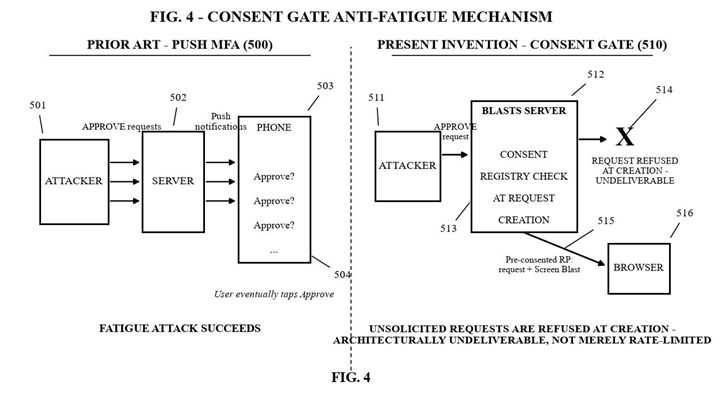
As filed — FIG. 4,
U.S. Provisional 64/119,849
Filed July 27, 2026. The animation reproduces the figure's topology and reference numerals (500–516) exactly; only color and motion are added.
Every SMS code is a
carrier invoice you keep paying.
Telecoms charge $0.05–$0.15 for every verification text. LoginBlasts routes approvals over the internet connection your users already have — the carrier line item goes to zero.
100,000 logins / month
SMS carrier fees / mo
~$10,000
With LoginBlasts
$0.00
~$120,000 saved / year
Assumes ~$0.10 per message — the midpoint of published $0.05–$0.15 U.S. carrier verification rates. Your telecom invoice may vary; the LoginBlasts carrier line is zero at every volume.
Mid-Market
10,000
logins / month
~$1,000/mo
$0.00
Save ~$12,000 annually
Municipal / Govt / B2B
Enterprise Standard
100,000
logins / month
~$10,000/mo
$0.00
Save ~$120,000 annually
Enterprise Scale
1,000,000
logins / month
~$100,000/mo
$0.00
Save ~$1.2M annually
Your seats are being shared.
You just can't see which ones.
Per-seat pricing assumes one person per seat. A shared password quietly turns six users into two invoices — and a password gives you no way to tell. LoginBlasts changes what a login is, and that changes what you can see.
Passive sharing has no mechanism here
LiveForwarded links. Shared passwords. Credentials in a group chat. None of it carries — because sign-in approval happens on one bound device, and the approval is a signature that device alone can produce.
Scoped honestly: this describes the typed-match and pick-match methods. One-tap is governed by our requester-known default — an unfamiliar machine is served the typed code instead, automatically.
Evasion tools don't apply
LiveAnti-detect browsers exist to defeat fingerprinting. They spoof canvas hashes, fonts, timezones, WebGL — an entire industry built to look like someone else.
They do not defeat a phone that has to say yes.
Sharing stops being a forward
and becomes a chore the owner performs
for every single login.
Sharing visibility from cryptographic facts — not surveillance
Most tools in this category answer "is this the same person?" by profiling the human: device fingerprints, canvas hashing, IP geolocation, behavioural biometrics. That is an arms race you cannot win, and in Europe it is increasingly a compliance problem rather than a feature.
We never ask that question. We already know which device key proved possession, because the login required it. The signal is a by-product of the sign-in you already trust.
What lands in your dashboard
The signals below are built from login facts we already hold. The surfaces that show them to you are in active development — labelled honestly, so you know exactly what exists today.
The new-screen tell
A machine that has never asked before, asking on an old account. Not a guess about a browser — a requesting key that either has a history with this account or doesn't.
Volume and breadth
Approvals per hour and per day, and how many different machines were approved inside the same window. Sharing has a shape: one account, five screens, Tuesday afternoon.
Seat Integrity view & webhook
A console list of accounts that look shared, and an event into your own systems when an account's picture changes — so your revenue team can act inside the tools they already use.
You set the friction, per organization
ComingDetection without a response is a report nobody reads. These are dials your customer's administrator sets — different answers suit a design agency and a hospital.
Approval caps
A ceiling on how many sign-ins one account approves per day.
Automatic step-up
Unfamiliar machine, or unusual volume? That sign-in is served a harder method — typed code instead of one tap.
Burst cool-down
After a rapid run of approvals, further requests wait out a window you choose.
Escalation only. A policy can make a sign-in harder; it can never make one easier than your baseline.
No additional code
You integrate LoginBlasts once, for sign-in. Seat integrity arrives as a property of that rail — computed on our servers, delivered to your console and your webhook endpoint. There is nothing extra to embed, no SDK to add, no agent to ship in your app.
No second vendor, no second meter
Bolting on a sharing-detection vendor means another contract, another meter, another sub-processor in your DPA, another security review. The signal here rides the login rail you already bought — and adds no one new to your data map.
What is a shared seat worth to you?
We publish no detection rate and no industry average — we have not measured one. So this uses your numbers and your estimate. Move the sliders.
Arithmetic only — seats x price x your estimate, then halved on the assumption that not every shared seat converts. No claim is being made about how many of your seats are shared, or how many would convert. That is exactly the number you currently cannot see.
Where seat sharing actually bites
One login serving many people costs the most where a seat is expensive and the work is easy to pass around.
Per-seat B2B SaaS
The classic: a team of six, two seats, one shared password in a pinned Slack message.
Data & research tools
High seat price, occasional use per person — the strongest possible incentive to share one login across a desk.
Courses & training
One purchased account, an entire cohort watching. Content platforms lose whole classrooms this way.
Design & dev tools
Contractors and agencies rotating through one account, often without anyone deciding to do it.
The point is not to catch anyone
A shared seat is not a thief. It is usually a team that outgrew its plan and never told you — which makes it the warmest expansion signal in your product. The play is a conversation, not an enforcement action.
See it
An account approving logins from five machines in an afternoon is not a mystery. It appears in your console and, if you want, in your CRM.
Open the conversation
"Looks like more of your team is using this than you have seats for — want a team plan?" That is an upsell email, not a legal letter.
Turn friction up only if you must
If the conversation goes nowhere, the dials make sharing inconvenient — daily caps, a harder method on unfamiliar machines. Your terms, your call, your timing.
The questions you are already thinking
Will this annoy my legitimate users?
Not by default. A person signing in from the machine they always use sees exactly what they saw yesterday. Friction only appears when your own policy says it should — and you set that policy, per organization.
Is watching for this legal?
We collect no fingerprints, no biometric templates, no location. The signals are facts your sign-in already produced — which device key approved, how often, how many distinct ones. Data minimisation is the design, not a policy bolted on afterwards.
What about my enterprise customers who share on purpose?
Shared service accounts, kiosks, and support desks are legitimate. Policy is set per organization, so the account that is supposed to be busy can be — while the single-seat plan next door is held to its plan.
How much work is this for my team?
If you have already integrated LoginBlasts for sign-in, none — the signals come from that rail. If you have not, the integration you are doing is the login, and this arrives with it.
What we do not claim here
- We do not block your customers. We surface signals and give you dials. Deciding that an account is abusing your terms is your call, under your agreement — never ours.
- We publish no detection percentages. We have not measured a rate, so we do not quote one. When we have measured it ourselves, we will say so and show the method.
- There is nothing to hand over — but an owner can still act for someone. The credential itself cannot be shared: no password, no link, no code exists to pass along. What a determined owner can still do is approve each sign-in personally, one at a time, for as long as they are willing. That is not sharing a login. That is performing one, every time — and it is visible.
- We do not watch what happens after sign-in. Our part ends at the door. What a session does inside your product is yours to meter.
Items marked Coming are in active development and are not available today. We label them rather than blur them — if a capability is on this page without that mark, it is running in production now.
What we do — and don't — claim
Security products love big claims. Here's exactly where we stand. No invented badges, no borrowed logos.
- Multiple authentication methods. Choose between typed 6-digit match, pick-match, one-tap approve, and biometric signing. Your organization decides which method best balances security and convenience.
- Software keys, honestly labeled. The device key lives in the operating system's protected keychain/keystore storage, verified on real hardware to survive a full power-off. We do not claim special security-chip hardware.
- We don't claim to be "faster." We haven't published timing measurements, so we don't make speed claims. What we claim is what we can prove: nothing secret is transmitted to you.
- What our servers see. Routine records are kept 30 days, security-warning records 90 days, then deleted. The canonical sentence from the filing is below — it is the whole policy.
- Status: early access. The underlying messaging network is live today; the sign-in approval feature is patent-pending and in final development. This page describes what it does, not a product you can buy this minute.
“We see who authenticates to which organization, when, and from what network origin; we record denials as security signals; we never see the content of what is approved.”
The login is the door.
Screen Blasts is the room.
Every approved sign-in proves something: the customer is real, their phone is in their hand, and the channel between you is live and verified. Most companies stop there. You don't have to.
The login opens a verified channel
The same consent-gated, phone-verified connection used to approve a sign-in is a live communication rail between your business and that customer. The identity proof doesn't disappear after the login — it stays active.
No carrier. No interception. No guessing.
Screen Blasts delivers encrypted messages directly through the Blasts extension to verified, paired phones — not through SMS carriers, not through open email. A message sent via Screen Blasts can only be read by someone holding the paired device.
One relationship. Two directions.
Your customer uses LoginBlasts to prove who they are. Your business uses Screen Blasts to reach them — fraud alerts, appointment confirmations, one-time offers — on a line only you two share. The same identity infrastructure, flowing both ways.
Your Business
PC Extension · LoginBlasts SDK
Your Customer
Blasts Phone App · Paired Device
Included in every LoginBlasts deployment
You secured the login.
Now own the conversation.
Screen Blasts, Email Blasts, and Text Blasts are part of the same Blasts protocol family. When you deploy LoginBlasts, you're one step away from a fully verified, two-way communication channel with every customer who signs in.
Explore the Full Protocol Familyblasts.app — Screen Blasts · Email Blasts · Text Blasts
Questions people actually ask
So there's really no code sent to my phone?
Why type a match code instead of just tapping Approve?
What happens if I lose my phone?
Is this free? What do organizations pay?
Can our organization add this to a portal people already use?
Is it built on real cryptography?
Want LoginBlasts for
your organization?
We're inviting counties, municipalities, financial institutions, and software makers to be first in line. Tell us about your login volume — we'll show you what eliminating per-message fees looks like.
The BlastsKit SDK targets Web, iOS (Swift), and Android (Kotlin). As-filed patent specifications are available to qualified evaluators under NDA.
Get in Line for Early AccessEmails go straight to AL@SavingsSites.com — no spam list, no form farm.